

If you ask most teams how contacts get into HubSpot, the first answers are usually manual entry or imports. Both matter, but they are only part of the picture.
HubSpot gives teams multiple ways to create contacts, and each method affects the quality of the data that enters the CRM. That matters more than many businesses realise. Contact creation influences lead routing, segmentation, reporting, follow-up quality, and how clearly sales leaders can see pipeline activity.
So, how many ways can you create contacts in HubSpot?
A practical answer is 10. There are several core web-based methods, multiple mobile workflows, and an advanced API-based option for businesses that need more control.
The goal is not simply to create more contacts. The goal is to create contacts in a way that supports better sales execution, better marketing follow-up, and better visibility across the customer journey.
Why Contact Creation Matters More Than It Seems
A contact record is not just a name and an email address. It is the starting point for:
- Lead qualification
- Assignment to the right rep
- Segmentation and nurture
- Activity tracking
- Attribution
- Reporting
- Future automation
If contact creation is inconsistent, teams often end up with duplicates, missing fields, poor lead context, and weak reporting. If it is handled well, HubSpot becomes more useful as a working sales and marketing system.
That is why this topic deserves more attention than it usually gets.
----------------------------------------------
1) Manually Create a Contact in the CRM
The most direct method is manual creation inside HubSpot.
A user can go to Contacts, click Create contact, and enter the person’s details. HubSpot recommends using an email address when possible because email helps deduplicate contacts and can support automatic company association.
Best for
- One-off contact creation
- Referrals
- Event contacts
- Adding stakeholders to active deals
- Internal lead capture by reps or admins
When it works well
Manual creation works best when a rep already has context and wants to create a clean record immediately.
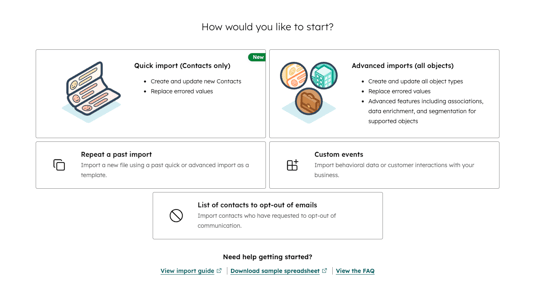
2) Import Contacts in Bulk
Imports are one of the fastest ways to create a large number of contacts when the data already exists elsewhere.
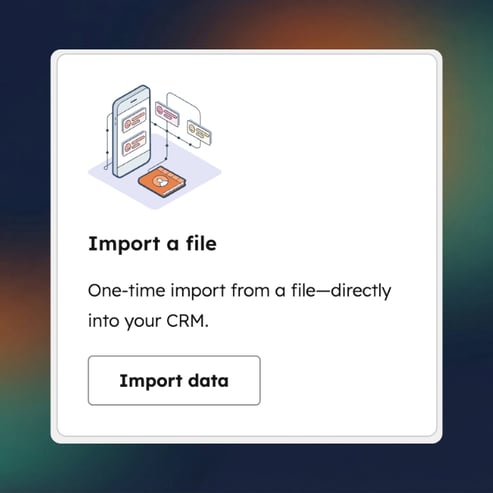
This is useful for CRM migrations, spreadsheet uploads, event databases, legacy prospect lists, or customer lists exported from another system.
Best for
- Bulk uploads
- Migrations
- Campaign or event lists
- Cleaning and loading existing data into HubSpot
Watch-out
Imports save time, but poor field mapping or weak spreadsheet hygiene can create a much larger clean-up problem later.
3) Capture Contacts Through HubSpot Forms
Forms are one of the most common lead generation methods in HubSpot. When a visitor submits a HubSpot form, HubSpot can create a contact record for that person.
Best for
- Website lead generation
- Demo requests
- Downloads
- Newsletter signups
- Enquiry pages
- Campaign landing pages
Why it matters
Forms do more than capture identity. They can also capture qualification context, which makes them much more valuable to both marketing and sales.
4) Create Contacts Through Meeting Links
This is one of the most useful additions to the list.
HubSpot meeting links are not just scheduling tools. They are also a valid contact creation path. When someone books through a meeting link, they enter required contact information, and a unique email submitted through that meetings form will create a new contact.
By default, meetings forms require First name, Last name, and Email.
Best for
- Consultations
- Demos
- Discovery calls
- “Book a Call” website CTAs
- High-intent lead capture
Why this deserves its own section
Meeting links are often treated as a follow-up tool, but they can also act as a lead generation tool on a website, in an email, or in live chat. HubSpot also allows meeting links to be shared directly or embedded depending on your setup.
Important nuance
HubSpot lets you add:
- Contact properties to the booking form, which are structured and reusable
- Custom questions, which are useful for one-off context but are not saved to a property
That distinction matters if you care about reporting, segmentation, and follow-up.
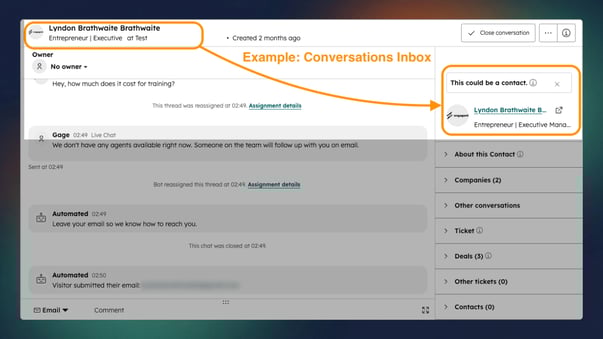
5) Create Contacts from Conversations and Chat
If someone reaches out through chat or inbox conversations, HubSpot allows users to create or associate a contact from that conversation flow.
Best for
- Inbound chat enquiries
- Support-led lead capture
- Converting unknown visitors into known contacts
- Fast-moving website conversations
Why it works
This helps prevent lead leakage when a conversation starts before a formal record exists in the CRM.
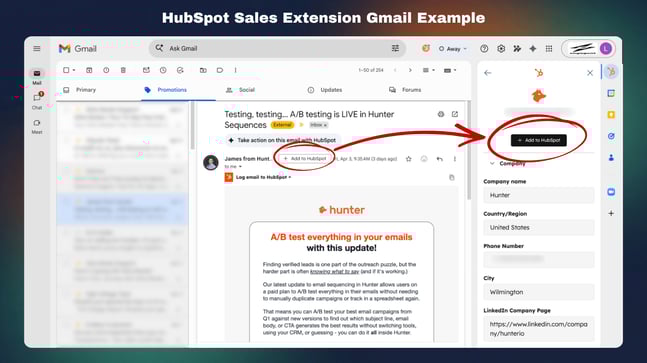
6) Use the HubSpot Sales Chrome Extension
HubSpot also supports contact creation through the HubSpot Sales Chrome extension.
This helps users create contacts while working in email rather than forcing them to leave their workflow and manually switch back to the CRM.
Best for
- Outbound prospecting
- Account management
- Email-led sales activity
- Low-friction CRM adoption for reps
Pro tip:
The HubSpot Sales Chrome extension is designed specifically for Gmail in Chrome. If your team uses Microsoft email, HubSpot’s recommended option is the Office 365 add-in, which works with Outlook on the web, Outlook.com, Outlook for Mac, and Outlook for Windows. The legacy Outlook desktop add-in is still supported in some cases, but it’s in maintenance mode and is no longer being actively developed.
Apple Mail is not supported.
----------------------------------------------
The 4 Mobile Ways to Create Contacts in HubSpot
7) Manually Create a Contact in the Mobile App
HubSpot’s mobile app allows users to create contacts directly from their phone.
Best for
- Field reps
- Trade Shows
- Networking Events
- Reps working away from a desktop
Why it matters
If a contact can be captured in the moment, there is less chance of losing context or failing to follow up.
8) Import Contacts from Your Phone
HubSpot’s mobile app can import contacts from a user’s phone. This is a practical option for salespeople who save contacts to their device first and need to move them into the CRM later.
.png?width=433&height=542&name=Import%20from%20phone_HubSpot_Mobile_Blog%20(1).png)
Best for
- Networking events
- On-the-go prospecting
- Field sales workflows
- Reps using their mobile phone as the first point of capture
Watch-out
Imported phone contacts without email addresses are harder to deduplicate and may be less useful for automation and association later.
9) Scan a Business Card into HubSpot
The mobile app also supports business card scanning.
Best for
- Conferences
- Trade shows
- Client visits
- In-person networking
- Event follow-up
Why it matters
This reduces manual re-entry and makes it more realistic for teams to get contacts into HubSpot quickly while the information is still fresh.
10) Scan a QR Code to Create a Contact
HubSpot also supports QR-code-based contact capture through the mobile app.
Best for
- Digital business cards
- Event booths
- Modern networking flows
- Contactless lead capture
This gives teams another fast route into the CRM without waiting for a person to fill out a longer website form later.
----------------------------------------------
Bonus: Create Contacts Through the API
For businesses with more advanced needs, HubSpot’s Contacts API allows contacts to be created programmatically.
This is especially useful when HubSpot needs to receive contacts from:
- Custom websites
- Internal systems
- External apps
- Partner portals
- Lead routing tools
- Operational platforms
Best for
- Technical teams
- Custom integrations
- High-volume data creation
- Automated contact syncing across systems
Pro Tip: Create the Right Contact Properties Before You Scale Lead Capture
This is one of the most important strategic points to get right.
Before building forms, meeting links, internal creation processes, or imports, define the contact properties your team actually needs. That way, you are not just collecting names and email addresses. You are capturing information that supports qualification, routing, reporting, and follow-up.
Final Thoughts
There are nine practical ways to create contacts in HubSpot — from manual entry and imports to forms, conversations, and mobile capture.
But the real value isn’t in knowing all the methods.
It’s in using the right method at the right moment, and making sure the data you capture actually supports what happens next.
Because contact creation isn’t just a step in the process.
It’s where your sales process begins.

Comments