

Quick Answer: A HubSpot workflow built to follow up on No Show, Rescheduled, and Cancelled meetings only runs when a meeting outcome has been logged. Its catch-all branch handles outcomes that don't match those three, but it does not catch meetings left with no outcome at all — because the workflow's trigger requires a known outcome to fire in the first place. Closing that gap requires a second, separate workflow built around missing outcomes, not mismatched ones.
Mark a meeting as No Show, Rescheduled, or Cancelled in HubSpot, and by default, nothing happens. No email goes out. No task gets created. Nothing tells the rep, or anyone else — that this contact needs attention. The system just... records it.
That's not a flaw in HubSpot. That's HubSpot waiting for you to tell it what "attention" should look like.
What is a HubSpot meeting outcome? It's a property on a logged meeting that records how the meeting resolved, typically Completed, No Show, Rescheduled, or Cancelled. It only gets set when someone (usually the rep) updates it after the meeting; HubSpot doesn't infer it automatically.
The problem is that follow-up is one of the highest-leverage moments in a sales process, and it's exactly the moment most likely to get lost. Reps are managing a full pipeline, a full inbox, and a full calendar at the same time, so when a meeting doesn't go as planned, the follow-up either takes a back seat or gets missed altogether. Not because anyone's careless. Because nothing in the system is forcing it to happen.
That's an operational CRM problem, not a HubSpot problem. The technology already has what you need, the meeting outcome property, a workflow builder, branching logic, email automation. What's usually missing is the process layer that tells the technology what to do with that data. CRM isn't software. It's strategy, supported by people, process, and technology, and this is a clean example of a gap that shows up when the process piece never got defined.
The fix, at a strategic level
We recently built this out end-to-end on the channel (full build embedded below), and the logic is straightforward once you see it:
- Trigger on contacts associated with any meeting where the meeting outcome is known and the meeting ended within the last day.
- Branch by outcome — Rescheduled, No Show, Cancelled — each cloned from the same structure with the criteria swapped.
- Communicate — each branch sends a tailored external email matched to that outcome, with the option to layer in internal notifications, tasks, or notes for the rep.
- Catch-all branch for anything that doesn't match the three — which internally notifies the contact owner that the outcome needs a second look.
That last piece is where it gets interesting.
Why doesn't the catch-all branch catch every missed meeting?
Here's the catch, and it's worth sitting with: that catch-all branch only fires when a meeting outcome was logged, just not one of the three you built branches for. It's a safety net for messy data, not missing data.
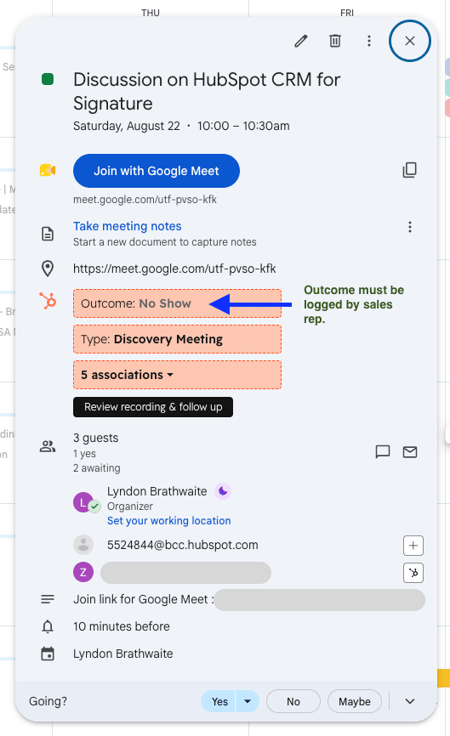
The image above shows a meeting update in Google Calendar. The workflow detects the change and takes the appropriate action.
A meeting that simply ends with no outcome logged at all never triggers the workflow in the first place — because the trigger itself requires the meeting outcome to be known. If a rep doesn't update the meeting, HubSpot doesn't know there's anything to act on. The automation you built to remove reliance on a rep remembering to follow up... still relies on a rep remembering to do one thing first.
That's not a reason to scrap the workflow. It's automating exactly what it was built to automate. It's a reason to be honest about what it covers and what it doesn't, because the gap it leaves open is the same gap it was built to close: a meeting that quietly goes nowhere because nobody flagged it.
| Meeting scenario | Outcome logged? | Trigger fires? | What happens |
|---|---|---|---|
| Rescheduled | Yes | Yes | Reschedule follow-up email sent |
| No Show | Yes | Yes | No-show follow-up email sent |
| Cancelled | Yes | Yes | Cancellation follow-up email sent |
| Outcome logged, doesn't match any branch | Yes | Yes | Catch-all branch notifies contact owner |
| No outcome logged at all | No | No | Nothing — the meeting is invisible to this workflow |
What it costs you if you leave it open
Every meeting that falls into that blind spot is a contact who was warm enough to book time with you, and is now sitting untouched with no system watching it. Multiply that across a sales team over a quarter, and it's not a rounding error, it's pipeline that never had a fair shot at moving forward, not because the deal went cold, but because the process never noticed it needed attention.
Where this goes next
The other half of this problem is a different build entirely: a workflow that catches meetings that ended with no outcome logged at all, rather than one that doesn't match your branches. Different trigger, different logic, same goal making sure nothing about a sales conversation goes unaccounted for. That's coming in a follow-up piece.
Key Takeaways
- Marking a HubSpot meeting outcome does nothing on its own, it takes a workflow to turn that data point into action.
- A trigger + branch + tailored communication structure is enough to cover Rescheduled, No Show, and Cancelled outcomes without custom code.
- The standard "catch-all" branch only handles logged-but-unmatched outcomes — it does not catch meetings with no outcome logged at all.
- That blind spot means the workflow's reliability is tied directly to how consistently reps log meeting outcomes.
- Closing the full gap requires a second, separate workflow built around outcome-missing meetings, not just outcome-mismatched ones.
--------------------------------
FAQ
What happens by default when you mark a HubSpot meeting as No Show?
Nothing. HubSpot records the outcome on the meeting and contact record, but no follow-up action happens unless a workflow is built to respond to it.
Can one HubSpot workflow handle No Show, Rescheduled, and Cancelled outcomes?
Yes — using a single trigger on "meeting outcome is known" and a branch action that checks outcome value, each branch can send its own tailored communication.
Does a catch-all branch cover meetings with a missing outcome?
No. A catch-all branch built on "none of the above outcomes met" only fires when an outcome was logged. Meetings with no outcome logged at all never satisfy the workflow's trigger condition in the first place.
Do I need HubSpot's Breeze AI to build this?
No — this can be built manually with standard workflow branching and email actions, which also makes it easier to understand and adjust step by step.
Hey 👋🏾...
Part 2 will walk through closing that last gap. In the meantime, if you're not sure your own HubSpot workflows are covering the moments that actually decide whether a deal keeps moving, that's exactly the kind of thing worth a second look.
Share your thoughts or questions