

If you are trying to understand Breeze quickly, here is the short version.
Breeze is HubSpot’s AI layer across assistance, content generation, research, automation support, and specialized agents. It helps teams work with CRM context, connected information, and repeatable workflows without starting from zero each time.
That is the product description.
The operational question is more useful: what work does Breeze actually make easier now, and where does it still depend on process, data quality, and clear internal structure?
TL;DR
Breeze can already help teams generate content, summarize CRM context, prepare for meetings, search connected apps, review product updates, reuse saved prompts, work from memory, and support task-specific agent experiences inside HubSpot.
It is most useful when the real problem is not writing or reporting in isolation, but the friction between scattered context and timely action.
It is not a substitute for CRM Discipline, clean data, defined handoffs, or documented process. AI can accelerate a good system. It also exposes a weak one faster.
What is Breeze in HubSpot?
Breeze is HubSpot’s AI layer across the customer platform. Today, that includes Breeze Assistant, AI Agents, content generation workflows, connected-app research, and newer experiences that help users move from one-off prompts toward repeatable operating support.
That matters because most teams do not have a content problem, or a reporting problem, or a follow-up problem in isolation. They have a coordination problem. The information exists, the tools exist, and the work still slows down because context is scattered across records, inboxes, meetings, apps, and content.
That is the gap Breeze is trying to close.
Not by replacing the work. By reducing the friction between knowing what needs to happen and actually doing it.
What can Breeze Assistant do right now?
Breeze Assistant is the part most users will touch first. It sits inside HubSpot as a conversational assistant that can help across sales, marketing, and service.
At a practical level, Breeze Assistant can help you:
- generate and refine content
- summarise CRM records and activity
- prepare for meetings
- review product updates
- use files as context for prompts
- search across connected apps
- create or update certain records and workflows through natural language
- reuse saved prompts
- reference previous conversations
- personalize responses over time through memories
That is not just chat. That is operational support inside the system where the work already lives.
Why Breeze is different from generic AI
Generic AI can write. That is no longer the differentiator.
The difference with Breeze Assistant is that it can work with HubSpot context. That includes your CRM data, your saved prompts, your files, your prior conversations, and in some cases your connected apps.
That changes the quality of the output.
If you ask a generic model to draft a follow-up, it starts from zero. If you ask Breeze, it can work from the actual company, deal, notes, activities, and recent interactions already sitting in HubSpot. The result is not magic. It is less disconnected from the work.
Most teams do not lose time because they cannot write a sentence. They lose time because every useful sentence depends on context scattered across five places. Breeze reduces that friction.
How Breeze helps with content creation
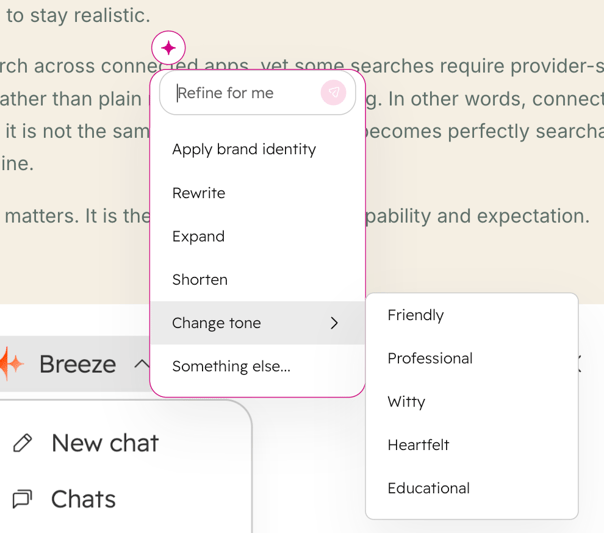
For marketing teams, Breeze can generate and refine content across blog posts, website blog posts, website pages, landing pages, CTAs, SMS, social copy, and other supported content surfaces inside HubSpot.
It can help by:
-
generating fresh draft content from prompts.
-
rewriting existing sections.
-
expanding or summarising sections.
-
changing tone.
-
applying brand voice.
-
generating images in supported contexts.
-
supporting blog drafting and reshaping inside the production flow.
-
helping teams create derivative content such as social posts from a core content asset
reducing the effort required to move from one content format to the next.
That matters because content work usually does not break at the idea stage. It breaks between stages.
A team writes the blog, then has to adapt the same thinking into social copy, campaign assets, follow-up variations, and channel-specific versions without losing consistency. That is the gap Breeze starts to close.
This matters less as a writing shortcut and more as a production shortcut.
The gap between a content plan and a publishable asset is usually not ideas. It is the repeated effort of drafting, reshaping, tightening, and aligning content to the same standard every time. Breeze helps compress that cycle.
But this is also where the missing layer matters.
Writing a blog is one job. Turning that blog into a repeatable content system is another.
If you want the article to support a broader point, name the rest of the operating workflow clearly:
-
content repurposing across formats and channels.
-
social post creation tied to a published or newly created blog.
-
workflow-driven handoffs after content is drafted or published.
-
review and approval steps before anything goes live.
-
campaign coordination across email, social, and landing pages.
-
prompt reuse so the team is not rebuilding the same instructions every time.
That is the more useful framing.
The question to ask is not whether AI can write a blog post. It can.
The better question is whether your team can move from one approved idea to a usable blog, supporting social content, and a more repeatable publishing rhythm with fewer handoffs and less repeated setup work.
That is where Breeze becomes operationally useful for marketers.
How Breeze helps teams work inside the CRM
A lot of CRM usage still looks like this: records get updated after the real work happens somewhere else.
That is not a CRM As Operational Strategy. That is delayed admin.
Breeze starts to change that by helping users act from within the CRM context itself.
Examples include:
- summarising a company, contact, or deal record
- pulling together recent notes, calls, and emails before a conversation
- identifying useful context for the next interaction
- creating records during or after meetings
- drafting follow-up messages from live account context
- helping users understand workflow behaviour and record history
The operational value here is speed with context.
A sales rep should not have to click through a record, then a note thread, then an email history, then a meeting list, then back to the record, just to figure out what matters before the next conversation. Breeze helps compress that review step.
Can Breeze work with connected apps?
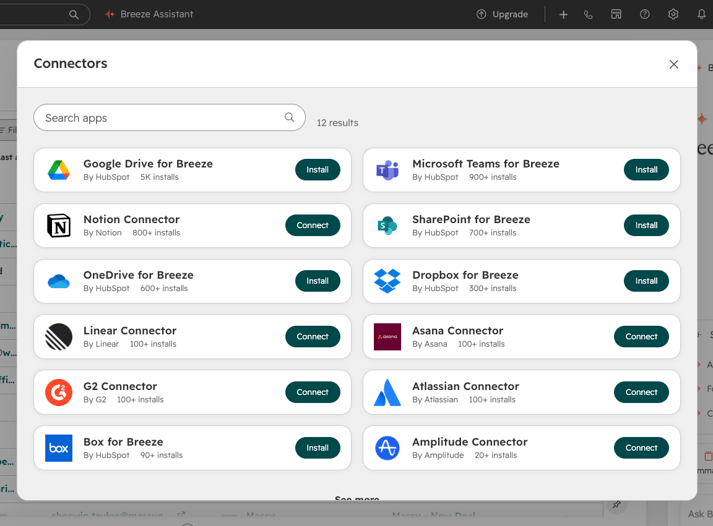
Yes, Breeze Assistant can use connected apps as sources, which means it can work from tools like email, documents, and workplace systems when those apps are installed and selected.
That is useful because the real customer story is rarely contained fully inside the CRM.
But teams need to stay realistic.
Breeze can search across connected apps, yet some searches require provider-specific query formats rather than plain natural language filtering. In other words, connected context is powerful, but it is not the same as saying every app becomes perfectly searchable in the way users imagine.
That distinction matters. It is the difference between capability and expectation.
What are Breeze memories, prompts, and Projects?
One of the more practical shifts in Breeze is that it is not limited to isolated prompts.
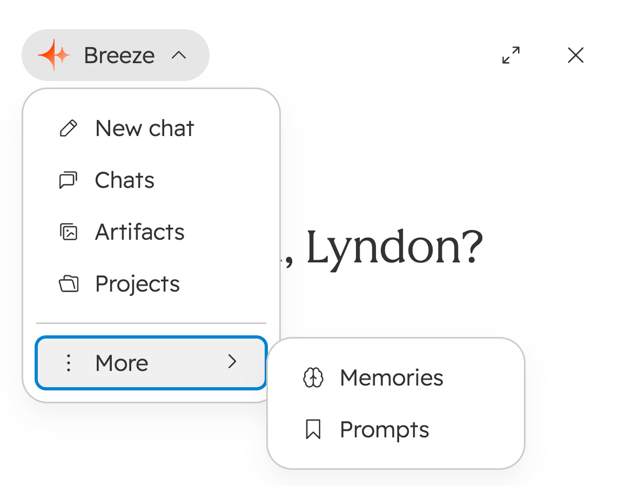
Users can save prompts, use previous conversations for continuity, and store certain preferences or recurring instructions as memories. HubSpot also describes Projects as configurable AI experiences created in Breeze Assistant to help with specific tasks or processes, following instructions, tools, and knowledge set by admins.
Projects matter, but they should not be the center of the article.
Right now, the stronger editorial move is to position Projects as part of the operating layer around Breeze, not as the headline feature. They show where Breeze is going: away from one-off chat and toward structured, repeatable working contexts.
That makes them important to mention, but not important enough to overpower the main story.
What are Breeze Agents?
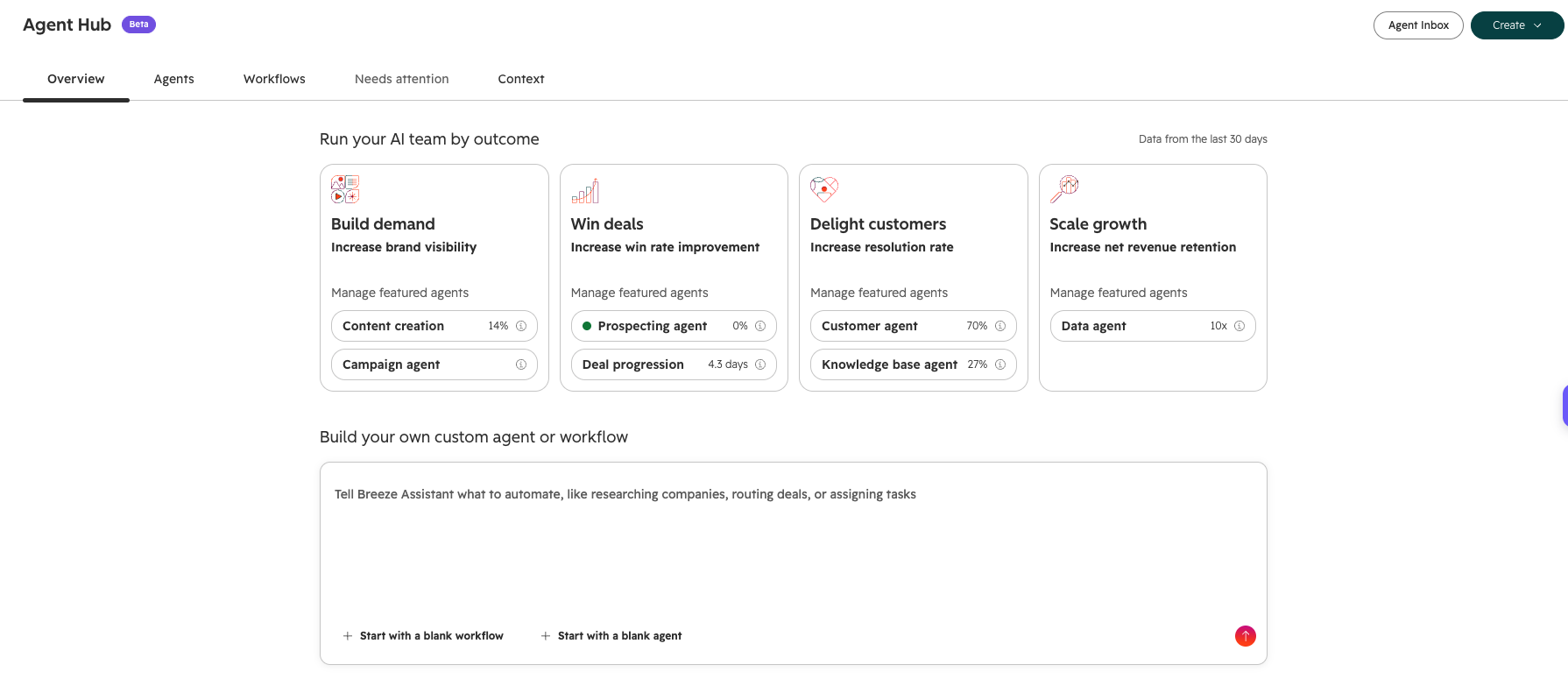
Breeze is not only a conversational assistant. HubSpot is also building around AI Agents that handle more specific work.
Based on current documentation and recent product updates, that includes agent experiences for areas such as:
- customer support
- content and research workflows
- social content creation
- quote and buyer assistance in commerce contexts
- agent building and customisation
- task-specific agent experiences in the marketplace
The important shift is this: the assistant helps a user do work. An agent is increasingly designed to own a defined slice of work.
That is the gap between asking for help and delegating a process.
Breeze Customer Agent is one of the clearest examples
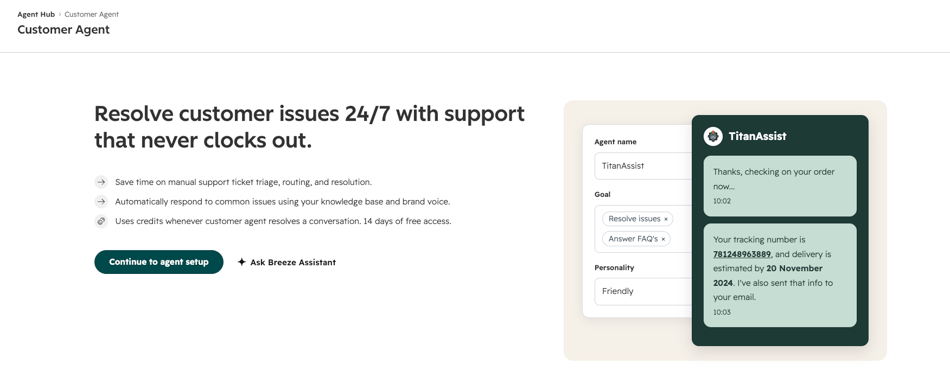
Breeze Customer Agent is designed to handle customer support inquiries automatically using the resources your business provides, such as help content, FAQs, and product documentation.
That makes it one of the clearest operational examples of where Breeze moves from assistance into execution.
Instead of helping a support rep draft a response, the agent can answer routine questions directly when it has the right training inputs.
That does not remove the need for service design. It increases the importance of it.
If your knowledge is weak, fragmented, outdated, or inconsistent, the agent will expose that weakness faster. AI does not remove operational maturity. It makes the absence of it more visible.
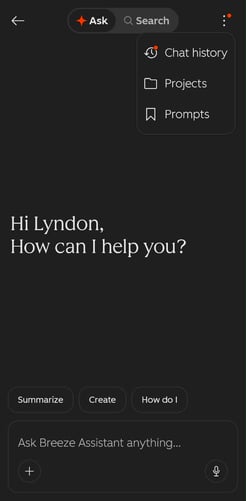
The image above shows Breeze in the HubSpot mobile app
Breeze is showing up in more places
Breeze Assistant is available in the HubSpot mobile app flow, where it can support prompts, files, images, meeting preparation, and ongoing conversations away from the desktop.
There is also continued expansion in how Breeze appears across other working surfaces, including the Sales Chrome extension and Slack-related experiences.
That matters because useful AI does not only belong in one panel.
Most teams do not work in a single place all day. If AI support only exists in one isolated workspace, adoption drops. The more Breeze appears in the places users already work, the more likely it is to become part of daily operating rhythm rather than a separate experiment.
What is new in Breeze right now?
Recent product updates show that HubSpot is still actively expanding Breeze capabilities.
Current updates include things like:
- scheduled prompts in Breeze Assistant
- Projects in Breeze Assistant on mobile
- the ability to create and iterate on documents in mobile experiences
- external sharing for Breeze artifacts through secure links
- a new look for Breeze Assistant
- continued improvements to Slack-related Breeze experiences
- support selection for Breeze on the workflow canvas
- newer agent-building workflows that help users describe what they want and have the system build in response
That matters for one reason above all: any article about Breeze goes stale quickly unless it is framed around what the platform is becoming, not just where one menu lives today.
What Breeze does not do for you?
This part matters as much as the feature list.
Breeze does not fix weak process design.
It does not create CRM Discipline where none exists.
It does not automatically make fragmented handoffs coherent.
It does not know what a Qualified Lead means if your team has never defined it.
It does not turn scattered internal knowledge into reliable support logic without someone doing the work to structure that knowledge first.
That is not a weakness in Breeze. That is the normal boundary of AI inside an operating system.
Most teams want AI to remove effort. Very few want to confront the design problems that make the effort messy in the first place.
But that is still the work.
When is a company ready for Breeze?
This is the more useful readiness test.
A company is more likely to get value from Breeze when:
- core CRM data is reasonably clean
- Lifecycle Stages, ownership, and handoffs are defined
- Pipeline Hygiene is taken seriously
- internal knowledge is documented well enough to support AI output
- leaders are trying to reduce friction in repeated work, not just experiment with AI for novelty
If those conditions are weak, Breeze can still be interesting. It is just less likely to be reliable.
Most businesses do not need perfect data before using AI. But they do need enough structure for the output to rest on something real.
The real value of Breeze is not speed alone
Most conversations about AI collapse too quickly into productivity language.
Yes, Breeze can save time. But time saved is not the only metric that matters.
The stronger value is often this:
- faster context gathering before action
- fewer handoffs between finding information and using it
- more consistent first drafts
- less repeated administrative effort
- better use of the data already sitting in HubSpot
- earlier visibility into gaps in content, process, or knowledge
That is a better way to evaluate it.
If your team is only asking whether Breeze writes faster, you are still looking at the surface. The deeper question is whether it reduces friction across the working system.
That is where the bigger return usually sits.
Breeze Assistant vs Breeze Agents
If the team is still mixing these together, keep the distinction simple.
Breeze Assistant helps a person work faster with context. Breeze Agents are more about owning a narrower, more defined slice of work.
That is not just a feature distinction. It is an operating distinction.
One supports execution. The other begins to absorb part of it.
---------------------------------
Frequently asked questions about Breeze
What is Breeze in HubSpot?
Breeze is HubSpot’s AI layer across assistance, content generation, connected research, workflow support, and task-specific AI Agents.
What can Breeze Assistant do?
Breeze Assistant can help generate content, summarize CRM context, prepare for meetings, search connected apps, review product updates, work from files, use memories, and support some record and workflow actions through natural language.
What is the difference between Breeze Assistant and Breeze Agents?
Breeze Assistant helps a user do the work with context. Breeze Agents are increasingly designed to handle a more specific type of work or process.
Can Breeze use CRM data and connected apps?
Yes. Breeze can work from CRM context, prior conversations, files, and, in supported cases, connected apps that are installed and selected.
Is Breeze enough on its own?
No. Breeze can improve speed and clarity, but it still depends on process quality, data quality, and documented internal knowledge.
Final thought
Breeze is best understood as an operating layer, not a novelty layer.
It helps teams generate content, review context, summarize work, research across systems, support customers, and begin delegating defined work to AI Agents. That is already meaningful.
But the real shift is not that HubSpot added AI.
The shift is that AI is increasingly being placed inside the actual flow of sales, marketing, service, content, and CRM work.
Most teams will look at Breeze and ask what features it has.
That is a fair starting point. It is not the most useful question.
The more useful question is this: where in your operation does context break down, handoff friction build up, and repeated work slow the team down?
That is where Breeze is most likely to matter.
Where this article fits in the buyer journey
This article is primarily a consideration-stage piece.
It is for readers who already know Breeze exists and are now trying to understand what it can do, where it fits, what it does not solve, and whether it is worth taking seriously inside their operation.
What to do next
If your team is evaluating Breeze, do not start by asking which feature looks impressive. Start by identifying where context slows execution, where follow-up breaks, where knowledge is scattered, and where repeated work keeps dragging the team backward.
That is usually the more honest starting point.
And it is usually where the best AI use case shows up first.
If you want help with that assessment, the work is not to bolt AI onto a weak system. The work is to identify the friction, clean up the architecture, and apply AI where it can actually support Revenue Impact.
Share your thoughts or questions